MalwareCleaning

  • Subscribe to our RSS feed.
  • Twitter
  • StumbleUpon
  • Reddit
  • Facebook
  • Digg
Showing posts with label fakeAV. Show all posts

Thursday, May 16, 2013

Scareware page pushing PC Speed Maximizer

Posted on 11:38 AM by Unknown

Everybody should by now be aware how most scareware (aka rogueware aka fake antivirus) operates:
you receive a warning message your PC is infected with malware, and a scan needs to run immediately to help you remedy the infections.

The latest scareware is System Care Antivirus:
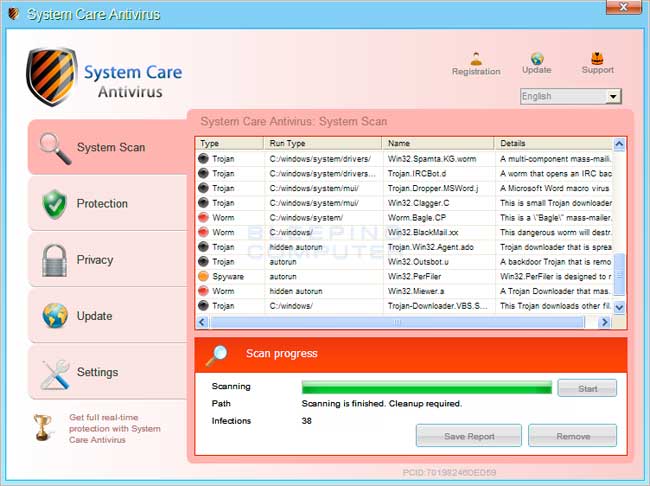
System Care Antivirus. (Source: BleepingComputer)


In the past, it was just that. Scareware pushes scareware. Scareware installs scareware. Not programs that can be considered as adware or Potentially Unwanted Program (PUP/PUA).


Thanks to a headsup from Maxstar on Twitter, I was able to see how scareware was pushing "PC Speed Maximizer", which can be considered as a PUP, but not as scareware.

PC Speed Maximizer, unlike "real" scareware does not have the following behaviour:

  • Annoying pop-ups everywhere, all the time
  • Blocking internet access
  • Blocking other programs (like Task Manager for example)
  • Showing numerous errors & malware infections (where there are none)
  • No real uninstall option (because it's malware)
  • Autostarts with the PC
  • Wants to rip off users


PC Speed Maximizer however does have the following behaviour:

  • Annoying pop-ups, but not constantly
  • Showing numerous errors (where there are none)
  • Autostarts with the PC
  • Wants to rip off users


So let's get to the point here. What is the purpose of this post? To show you an apparently new tactic on how PC Speed Maximizer wants to gather money from not technically savvy users.

A new page has been set up at hxxp://pcspeedplus.com
URLVoid Result
PasteBin script


When visiting this page, you are presented with the following message:

"Critical Security Warning!" Oh really?


This pop-up or messagebox is typical for scareware, clicking the X or clicking OK has the same result...


A "scan" starts running right away:


"Virus infections have been detected!" - XP Micro Antivirus


The following file gets downloaded:
PCSpeedMaximizer.exe
MD5:  e557bf40e5b374b2fe65cfb2502f0a99
Result: 3/46
VirusTotal Result
Anubis Result
Malwr Result
ThreatExpert Result


This file is also digitally signed:
File is digitally signed with its own cert...


Thanks to a great post here, you can find the extracted digital certificate on Pastebin:
http://pastebin.com/50cUYHEc

Surely, this is not an "APT", but it's still interesting such a piece of crap is digitally signed.


PC Speed Maximizer Setup:

Setup screen

Items to clean and optimize on your PC

Obviously there aren't that many errors on my machine, interestingly enough, it's as good as fresh out of the box. To actually be able to fix the errors you have to pay up, what a surprise.

When looking around on Google a bit, it seems others are suffering from the same scareware page and the pushing of this... software:
http://answers.microsoft.com/en-us/protect/forum/protect_other-protect_scanning/url-httppcspeedpluscomscan-keeps-bringing-up-fake/30ed02a6-2bb0-4165-84ac-56a188cfb131

This user was apparently getting fake messages when clicking on a Yahoo ad, when I received this headsup, it apparently spreads through Google Images as well.


Prevention


- Be careful when visiting any webpage. A useful trick is to check the real URL behind the image. Most of the times you can verify this by checking in the left corner of your browser:

Clicked on a picture and started loading this website instead of the original one

- Use browser extentions to verify the integrity of an image or URL. Useful add-ons for Google Chrome are for example NotScripts and WOT . For Firefox you have NoScript and WOT as well.

- Keep your Antivirus and browser, as well as your browser add-ons up-to-date.

- If it is too late and a 'scan' is already starting, immediately close your browser by bringing up Task Manager (CTRL+ALT+DEL or CTRL+SHIFT+ESC) and killing your browser's process:
  • a) For Google Chrome: chrome.exe or chrome.exe *32
  • b) For Mozilla Firefox: firefox.exe or firefox.exe *32
  • c) For Microsoft's Internet Explorer: iexplore or iexplore.exe *32


Desinfection

If the harm is already done and you are getting warnings, messages or pop-ups stating there are several errors and you need to take 'immediate action' to clean your computer, go to your
C:\Program Files\PC Speed Maximizer or C:\Program Files (x86)\PC Speed Maximizer folder and double-click on unins000.exe. The program will now uninstall itself. In that perspective, it is way less intrusive than real scareware.


Conclusion


  • Don't be fooled by warnings or message trying to scare you, it's all fake.
  • Follow the above prevention tips to decrease the chance of your computer becoming infected.


Final word: adware and/or PUP has always been annoying, and in a "grey" area for antivirus & antimalware applications to detect or not, since most of the times the EULA clearly states it's installing this software and you (as "the user") agree(s). However, pushing PUP via scareware is a new concept. I've made an earlier post about PUP and how you can prevent it as well:
http://bartblaze.blogspot.com/2013/01/about-youtube-top-comments.html

Stay safe.


Read More
Posted in adware, blog update, fakeAV, PC Speed Maximizer, pcspeedplus, PUP, rogueware, scareware | No comments

Tuesday, April 24, 2012

You HAVE to check this picture

Posted on 7:22 AM by Unknown
In today's post, we'll be highlighting an older trick that's being used again by spammers and malware authors.

I received the following mail:


"Excuse me,I got to show you this picture in attachment. I can't tell who gave it to me sorry but this chick looks a lot like your ex-gf. But who's that dude??."


Some other example mails with a similar subject and content:
RE:Check the attachment you have to react somehow to this picture
Hello ,
I have a question- have you seen this picture of yours in attachment?? Three facebook friends sent it to me today... why did you put it online? wouldn't it harm your job? what if parents see it? you must be way cooler than I thought about you man :)))) .

RE:You HAVE to check this photo in attachment man
Hi there ,
But I really need to ask you - is it you at this picture in attachment? I can't tell you where I got this picture it doesn't actually matter... The question is is it really you???.

There are a few more but I'll stop there. In all cases, you HAVE to check the picture in attachment, how else can you be sure it's not you in an embarrasing photo ;-) ?

Attached is a file called IMG9837.dat. In fact, an executable is embedded with the exact same name:


An Adobe icon is used to trick the user


When executing this file, it will phone home or call back (this term is used for malware that is connecting to a remote address for either receiving instructions or downloading additional malware) to the following IP: 92.246.166.131


Scanreport by IPvoid - http://ipvoid.com/scan/92.246.166.131


In this case, the malware downloads an additional executable called fas.exe. Let's review some more information about both files:


IMG9837.exe
Result: 26/42
MD5: bc3f1b422b01781ad23bd33340ece671
VirusTotal Report
ThreatExpert Report
Anubis Report


fas.exe
Result: 3/41
MD5: 6ffb6ce20915dfb7f723d46fcea87b3f
VirusTotal Report
ThreatExpert Report
Anubis Report


In this case, fas.exe will load one of the known fake Defragger rogues, for example:


System Defragmenter. This rogueware also hides your Desktop and Start Menu
(picture: bleepingcomputer.com)


Prevention

- Be wary when receiving such emails, even if it's from someone you know.
- Don't open attachments from unknown senders - ever.


Desinfection

If the harm is already done and you are getting warnings, messages or pop-ups stating you are infected and you need to take 'immediate action' to clean your computer, follow the guide below at BleepingComputer's to rid yourself of this malware:

BleepingComputer's Virus Removal


Conclusion

Pretty simple. Never open any emails from unknown senders, and certainly not attachments.

Keep your Antivirus and Operating System up-to-date, as well as your applications (for example Adobe and Java) !

Follow the steps above should you have been hit by this spam campaign/rogueware.
Read More
Posted in blog update, fakeAV, malware, rogueware, spam | No comments

Wednesday, April 11, 2012

Hacked Hotmail accounts... and the consequences

Posted on 4:14 AM by Unknown
It's a trend I'm seeing more and more, even with some of my relatives:

Their Hotmail account is getting hacked, and from then on is being used by scammers or malware authors to spread their malicious intent.

In almost all cases, you'll receive an email with (No Subject), and the only content is a link pointing to some website. But wait: it seems that all those websites have (probably an outdated version of) Wordpress installed.

When you click the link, you will be redirected to either a scam/phishing page or scareware/rogueware.

Either way, you'll first get the following message:


Message you receive when clicking on the link

So let's take a closer look at the 2 scenarios you get on your plate:

Scenario #1 - scam


Scam page

In scenario number one, you'll be presented with an awesome News page, where you can read several testimonials of how great working from home is.

It also has some fascinating news stories on how to make lots of money by simply being at your comfortable home. This includes reactions on the articles - of course this is all fake.

If you click on any of the links on this website, you'll be ultimately redirected to - hxxp://internetprofitpacket.com

Administrative Contact:
WhoisGuard
WhoisGuard Protected
+1.6613102107
Fax: +1.6613102107
11400 W. Olympic Blvd. Suite 200
Los Angeles, CA 90064
US


UrlQuery Result:
Suspicious
http://urlquery.net/report.php?id=40849

URLvoid Result:
1/25 (4.00%)
http://www.urlvoid.com/scan/internetprofitpacket.com/


Ultimately you land on the following page:


Landing page where you'll need to pay

After paying a small price, you'll get lifetime access to the Internet Profit Package ! What honor !

Obviously, you'll get scammed and your credit card details might get stolen.


Scenario #2 - scareware

Likewise as in scenario #1, you'll get the nice message that you got here thanks to your friend.


Seems like you're infected ... right ?

You'll then be presented with a pop-up indicating critical process activity has been found and a scan will be launched... (I think we all know this one by now) :


Fake Explorer window indicating numerous infections

If you click on any button, a file will be downloaded with the name of setup.exe.

In this case, the file was downloaded from:
hxxp://fail-safetylow.info/bb61f9bcec711d56/29/setup.exe

This site and several other rogueware pages are hosted on the IP:
64.120.207.107


Several other rogueware sites are hosted on this IP


We'll now see some more details about the downloaded file:

setup.exe
Result: 5/40
MD5: 8b0c16a50c0bca1eb0b45bd411eb30e5
VirusTotal Report
ThreatExpert Report
Anubis Report

This file drops another executable:

Protector-hfpt.exe
Result: 5/42
MD5: f04cb906356f19a1dbf68c62f162c4e7
VirusTotal Report
Anubis Report


The payload is a rogueware called "Windows Antibreaking System" :


Windows Antibreaking System setup screen


Windows Antibreaking System main screen


Prevention

- Most important of all: use a strong password ! You can verify your current password, or create a new one to check its strength on the following website: http://www.passwordmeter.com

- Second important rule:
don't use the same password for each and every website !

- Be wary when receiving such a mail, even if it's from someone you know.

- Use browser extentions to verify the integrity of an image or URL. Useful add-ons are for example WOT or NoScript.

- Keep your Antivirus and browser, as well as your browser add-ons up-to-date.

- If it is too late and a 'scan' is already starting, immediately close your browser by bringing up Task Manager (CTRL + ALT + DEL) and killing your browser's process:
  • a) For Google Chrome: chrome.exe or chrome.exe *32
  • b) For Mozilla Firefox: firefox.exe or firefox.exe *32
  • c) For Microsoft's Internet Explorer: iexplore or iexplore.exe *32


Desinfection

If the harm is already done and you are getting warnings, messages or pop-ups stating you are infected and you need to take 'immediate action' to clean your computer, follow the guide below at BleepingComputer's to rid yourself of this malware:

BleepingComputer's Virus Removal


Also, if you know the sender personally, notify him/her that they've been hacked and they need to change their password. If you don't know the sender, immediately remove the email.

In Hotmail, you even have a useful option if you know the sender. Open the email, select Mark as and click on My friend's been hacked!


Help your friend by stating (s)he's been hacked


If you happen to have a Wordpress website, be sure to update it regularly as well as any Wordpress plugins you may have installed. This website will aid you in the matter: Hardening WordPress


Conclusion

Don't fall for either of these, in both cases you'll lose a lot of money !

Follow the above prevention tips to decrease the chance of your computer becoming infected.
Read More
Posted in blog update, cracked hotmail, fakeAV, hacked hotmail, Hacked Hotmail accounts, malware, phishing, rogueware, scam, Windows Antibreaking System | No comments

Tuesday, April 26, 2011

Technoviking ? I am not amused

Posted on 12:23 PM by Unknown
So yesterday I was looking on Google Images for the 'Technoviking'. I'm sure most of you know the guy/meme but just to be sure:


http://knowyourmeme.com/memes/technoviking

In case you're wondering, I do not remember why he flashed in my mind all of a sudden, but I was listening to some music on Youtube and I suppose there was a Suggested Video wink .

Either way, some of the Google Images were in fact redirecting to a scareware page, urging you to download a file to "clean" your computer. Some of the images that were infected:


Some infected Google Image results


If you click on any of them, you would get the following message:


"Windows Security" will perform a fast scan of system files


... and when clicking on "OK" you'll get the well-known fake scanning page:


Fake Scanning page finding numerous infections


The following file was downloaded:

BestAntivirus2011.exe
Result: 18/41 (43.9%)
MD5: e705b657f5830eb2a43eee3a32f549c3
VirusTotal Report
ThreatExpert Report
Anubis Report

Today I checked again and the scareware/rogueware campaign is still active. I was now presented with another file that has a very low detection rate on VirusTotal:

BestAntivirus2011.exe
Result: 2/41 (4.9%)
MD5: 56ce5479183913f2082bf0fd790dbaea
VirusTotal Report


The payload is a rogueware called 'MS Removal Tool'.

When executing the dropped file (BestAntivirus2011.exe) :


MS Removal Tool fake scanning screen


It is interesting to note that you would only get redirected when using Internet Explorer or Google Chrome. Neither on Firefox 3.6 or Firefox 4.0 the redirect would commence.


Prevention

- Be careful when visiting any webpage. A useful trick is to check the real URL behind the image. Most of the times you can verify this by checking in the left corner of your browser:

Clicked on a picture and started loading this website instead of the original one

- Use browser extentions to verify the integrity of an image or URL. Useful add-ons for Google Chrome are for example VTchromizer, NotScripts and WOT .

- Keep your Antivirus and browser, as well as your browser add-ons up-to-date.

- If it is too late and a 'scan' is already starting, immediately close your browser by bringing up Task Manager (CTRL + ALT + DEL) and killing your browser's process:
  • a) For Google Chrome: chrome.exe or chrome.exe *32
  • b) For Mozilla Firefox: firefox.exe or firefox.exe *32
  • c) For Microsoft's Internet Explorer: iexplore or iexplore.exe *32


Desinfection

If the harm is already done and you are getting warnings, messages or pop-ups stating you are infected and you need to take 'immediate action' to clean your computer, follow the guide below at BleepingComputer's to rid yourself of this malware:

Remove MS Removal Tool


Conclusion

Don't be fooled by Google's preview of images, you can still get infected even though the site appears to be safe.

Follow the above prevention tips to decrease the chance of your computer becoming infected.
Read More
Posted in blog update, fakeAV, google image poisoning, google images, low detection, malware, rogueware, scareware, technoviking | No comments

Tuesday, February 8, 2011

"m28sx" worm: back in business ?

Posted on 8:31 AM by Unknown

You might remember my previous post about a new Twitter worm called "m28sx" that spreads a fake antivirus (aka rogueware) called Security Shield:
Twitter worm spreading virally

Today I got an email with the subject "HELLoo" and only a link in it. The link ended with m28sx.html.


Different redirects starting at the compromised website


There are 3 redirects before you eventually land on the fake scanner page:

Messagebox alerting you of infections on your system


Fake scan message showing numerous infections


The following file is dropped:

pack.exe
Result: 7/43 (16.3%)
MD5: b7fcca77d20fb5ac43792ad56f6fc75e
VirusTotal
ThreatExpert
Anubis

The payload is a rogueware called 'Security Shield'.

When executing the dropped file (pack.exe) :

A warning that Security Shield was installed successfully


Security Shield rogueware finding (non-existant) infections


Conclusion

Always be careful when clicking on a URL that you do not recognize or is shortened so you cannot see the real URL. In this case, a website was compromised and the "m28sx.html" was placed. Actually, be careful with ANY URL ;) .

If you do happen to land on one of these rogueware pages presenting you a fake scan of your disks, open Task Manager and end your browser's process.

As an extra note: this one might re-surface again on Twitter, so be on the lookout these days for links that end with "m28sx".


Read More
Posted in blog update, fakeAV, low detection, malware, rogueware, spam | No comments

Thursday, January 20, 2011

Twitter worm spreading virally

Posted on 4:56 AM by Unknown
Since today there's a Twitter worm spreading virally with the name "m28sx" . People and bots tweeting links that end with m28sx.html or have only an URL in their tweet are common today on the social network platform.

At time of writing this threat still persists, although Google has already disabled a lot of URLs. (URLs used in this attack are mainly t.co and goo.gl)


After different redirects starting at:

to

and eventually landing on

Presents you with a nice message that you are infected:

Immediately you receive the well known fake scan page:


Infected search terms on Twitter also include:
50th anniversary of JFK's inauguration
John F. Kennedy inaugural address
Love the new homepage

Check out these search results for m28sx (be careful with the links on these pages, some of them might still be active ! ) on Twitter:
https://twitter.com/#!/search/links/m28sx.html or
https://search.twitter.com/search?q=m28sx.html

Dropped files:

pack.exe
Result: 3/43 (7.0 %)
MD5: bae499fc5844d814f942e870900c9d57
VirusTotal
ThreatExpert

pack(2).exe
Result: 3/43 (7.0 %)
MD5: 921b903e2ff6ae23833301aa2961be95
VirusTotal
ThreatExpert

They payload is a rogueware called 'Security Shield'.

When executing either of the dropped files:

A warning that Security Shield was installed successfully.


Security Shield rogueware finding (non-existant) infections.


Conclusion

Pretty straightforward: do not click on any of the links ! ( You also might want to use a 3d party application to browse on Twitter, like Echofon or Twhirl. )

Always be careful when clicking on a URL that you do not recognize or is shortened so you cannot see the real URL.

If you do happen to land on one of these rogueware pages presenting you a fake scan of your disks, open Task Manager and end your browser's process.

Read More
Posted in blog update, fakeAV, low detection, malware, rogueware, spam, twitter | No comments

Wednesday, December 15, 2010

RapidShare used to spread rogueware

Posted on 4:46 AM by Unknown
Besides the usual spam this morning, in the likes of "very good news . now you can buy new iphone 4 from this site! ",

I had also received an email from someone I know. It was sent to all of his contacts, including me. The message only contained the following URL:


Link to Rapidshare to download a file called "surprise.exe" I have obfuscated the URL for your safety.

It comes to no surprise that actually this file is rogueware with the name Security Shield. Below you can find an example screenshot of this rogue:


Security Shield rogueware


surprise.exe
Result: 11/42 (26.2%)
MD5: a6af97e7a5fd59c82b4c08a568eae882
VirusTotal
Anubis Report
ThreatExpert Report

When executing the downloaded file ( surprise.exe ):


Conclusion


Besides coming from a trusted person, this rogueware program is also using Rapidshare as a 'mirror' for spreading. Also, the file has the name "surprise.exe" which may convince you even further that your friend has just sent you a message with a nice surprise e-card or similar. After all, you know the person who sent it, why would it hurt ?

The above pictures proove why. I doubt you'd want some rogueware sitting on your computer. The trick is you should never trust an email which has:

- only a URL included in the message
- crappy spelling and grammar if there is content in the message
- been sent out to everyone in the sender's address book
- been sent from an unknown sender
- promises you can buy something for a very cheap price
- No subject or strange subjects ( eg.: "0 enjoy yourself" )

If you have downloaded a program and you are unsure about its intentions, you can always upload it to VirusTotal or other online virusscanners (VirScan, Jotti). Keep in mind that if a file is not detected by any engine, it is not necessarily clean!

Peace out.
Read More
Posted in blog update, fakeAV, low detection, malware, rapidshare, rogueware | No comments

Saturday, December 4, 2010

new rogue: PCoptimizer 2010

Posted on 8:52 AM by Unknown
As already stated in my previous post, there are two new rogues (rogue security software, rogueware) lurking around:

PrivacyGuard 2010 and PCoptimizer 2010

You can be presented with either of these GUIs:


PrivacyGuard 2010 (picture: BleepingComputer)


PCoptimizer 2010


If you execute any program, you can be presented with the following pop-up:


PCoptimizer 2010 pop-up


I also made a small video on how you can disable this rogue and access your programs again. In this video I targeted PCoptimizer 2010, but you can also apply these steps on PrivacyGuard 2010.


Direct link to HD video on YouTube


6 easy steps:

1) Go to Start > Run
2) Type in: C:\windows\system32
3) Find taskmgr.exe and make a copy
4) Paste taskmgr.exe on your desktop (for example) and rename to explorer.exe
5) Locate the process for the rogue (in this case, PCoptimizer 2010.exe) and click on End Process
6) You can now execute your Antivirus or Antimalware tools again, or browse the internet and download one :) .
Read More
Posted in blog update, fakeAV, malware, rogueware, video | No comments

Thursday, December 2, 2010

new rogue domain: privacyguard2010.com

Posted on 12:44 PM by Unknown
Whois record for privacyguard2010.com

Registrant Contact:
Name: Bayangol Duureg, Undsen Khuuliyn Gudamj 24
Address: 15111 N. Hayden Rd., Ste 160, PMB 353
City: Ulaanbaatar
Country: Mongolia

hxxp://privacyguard2010.com
Result: 3/17 (18 %)
Domain Hash: fec975d80b19c2ec3ce80fac1cd7800b
URLVoid
Note: this page does not trigger a "scan" of your computer, however, you can download a malicious file. Visit at own risk !

Some related domains:
hxxp://pcprotectioncenter.com/
hxxp://privacycorrector.com/
hxxp://pcoptimizer2010.com/
hxxp://psccenter.com/
hxxp://controlcenter2011.com/


The following file was downloaded:
setup.msi
Result: 1/43 (2.3%)
MD5: 92577052e1f4f51cb74d37727d032168
VirusTotal
ThreatExpert Report

This file drops:
PCoptimizer2010.exe
Result: 2/43 (4.7%)
MD5: 6ad932b045a4ac666659d496a81af52d
VirusTotal
Anubis Report
ThreatExpert Report

Screenshot examples:

PrivacyGuard 2010 home page


When executing the file (PCoptimizer2010.exe)
PrivacyGuard 2010 installation wizard
Read More
Posted in blog update, fakeAV, malware, phishing, rogueware | No comments
Older Posts Home
Subscribe to: Posts (Atom)

Popular Posts

  • League of Legends RP hack
    I recently blogged about a (still current) scam targeting players of the online game League of Legends: Free Riot codes scam . When re-check...
  • test for the blog
    Just testing ... :-)
  • Facebook Support. Personal data has been changed!
    There appears to be a new malicious email being sent out with the subject: " Facebook Support. Personal data has been changed! ID7530...
  • WinMHR: Free Malware Detector
    Today I checked out WinMHR brought to you by: Team Cymru Now, what exactly is WinMHR ? (This is copied from the website) WinMHR is... Free ...
  • Malware Puzzle
    A malware (crossword) puzzle you say? Yes! Why not? I've made a puzzle about malware (and security) related keywords. It comes in .PNG f...
  • Brazilian banking Trojan tricks
    So I encountered what I suspect to be a banker focused on Brazilian banks. (Win32/Bancos) Part 1 - spam mail : Fiscal note Mail from: mail.u...
  • Increase in Dutch banking phishing
    Recently I made a post on Malware Disasters about an increase of targeted phishing in the last few monts. The focus was mainly on Dutch (an...
  • Gina Lisa Facebook scam
    Yet another Facebook scam, this time luring users with a sextape from Gina Lisa, whom is apparently a German model: Yet another Facebook sca...
  • A word on XDocCrypt/Dorifel/Quervar
    I'm sure everyone has heard by now about the so called XDocCrypt/Dorifel/Quervar malware. It has mostly damaged machines in The Netherla...
  • FedEx spam loads malware
    Received an email from (supposedly) FedEx today, seems my parcel was unable to be delivered: Print your receipt!     Mail details: Subject: ...

Categories

  • ACH transfer
  • adobe
  • adobe exploit
  • ADP
  • adware
  • affiliate
  • all your data are belong to us
  • antimalware
  • asprox
  • bancos
  • banking trojan
  • basic malware cleaning
  • battle.net
  • blackhole exploit kit
  • blog update
  • botnet
  • brazilian banking trojan
  • brucon
  • change facebook color
  • conduit
  • cracked hotmail
  • credit card blocked
  • crimeware kit
  • CVE-2006-0003
  • CVE-2010-0840
  • CVE-2012-4681
  • cybercrime
  • d3
  • diablo
  • diablo III
  • diablo phishing
  • DLL injection
  • Dorifel
  • dorkbot
  • encryption
  • end of july
  • exploit
  • exploit kit
  • exprez
  • facebook
  • facebook dislike button
  • facebook event
  • facebook scam
  • Facebook spam
  • facepalm
  • Fake Symantec security check
  • fakeAV
  • fareit
  • FedEx
  • FedEx spam
  • first post
  • flv media player
  • foistware
  • free riot code scam
  • free riot codes
  • free riot points
  • free riot points scam
  • free RP generator
  • fun
  • gina lisa
  • google earth
  • google image poisoning
  • google images
  • hacked hotmail
  • Hacked Hotmail accounts
  • hakin9
  • Hewlett-Packard ScanJet
  • hotfile
  • hotmail
  • illegal games
  • infostealer
  • ING
  • IP and RP Hack Download
  • java
  • java exploit
  • kuluoz
  • lame old malware
  • League of Legends
  • League of Legends MultiHack Generator
  • League of Legends RP generator
  • League of Legends RP hack
  • linkedIN
  • LoL
  • LoL RP Hack
  • low detection
  • malvertising
  • malware
  • malware analysis
  • malware analysis lab
  • malware cleaning
  • malware lab
  • malware puzzle
  • malware tools
  • medfos
  • messenger
  • MSN
  • neosploit exploit kit
  • paypal
  • paypal spammail
  • PC Speed Maximizer
  • pcspeedplus
  • PDF
  • phishing
  • poker games
  • potentially unwanted program
  • pricegong
  • PUP
  • pushdo
  • Quervar
  • Question and Answer
  • rabobank
  • ransomware
  • rapidshare
  • redkit exploit kit
  • RemovalTool.exe
  • Riot codes scam
  • Riot points scam
  • roguevertising
  • rogueware
  • rootkit
  • sasfis
  • scam
  • scareware
  • security
  • security conference
  • security.nl
  • skype
  • skype worm
  • social engineering
  • spam
  • spear phishing
  • spim
  • survey scam
  • team cymru
  • technoviking
  • tepfer
  • test
  • trojan
  • twitter
  • United Parcel Service
  • UPS
  • UPS spam
  • verizon spam
  • video
  • vmware
  • wellsfargo
  • whitesmoke
  • Windows Antibreaking System
  • windows live
  • WinMHR
  • worm
  • XDocCrypt
  • yontoo
  • youtube
  • youtube comment spam
  • youtube spam
  • youtube top comments
  • zeus

Blog Archive

  • ▼  2013 (18)
    • ▼  September (2)
      • Malware: the blame game
      • PayPal spam leads to malware cocktail
    • ►  August (2)
    • ►  July (1)
    • ►  June (3)
    • ►  May (2)
    • ►  April (1)
    • ►  March (1)
    • ►  February (3)
    • ►  January (3)
  • ►  2012 (14)
    • ►  November (1)
    • ►  October (2)
    • ►  September (2)
    • ►  August (3)
    • ►  July (1)
    • ►  June (2)
    • ►  April (3)
  • ►  2011 (15)
    • ►  December (1)
    • ►  September (1)
    • ►  June (1)
    • ►  April (3)
    • ►  March (1)
    • ►  February (5)
    • ►  January (3)
  • ►  2010 (14)
    • ►  December (3)
    • ►  November (1)
    • ►  October (6)
    • ►  September (2)
    • ►  August (1)
    • ►  March (1)
Powered by Blogger.

About Me

Unknown
View my complete profile